A Complete Guide to Choosing NDIS Software in Australia
Choosing new software is a significant investment for any NDIS provider. The right platform can improve productivity, simplify compliance and help your team spend more time supporting participants instead of managing paperwork. The wrong choice, however, can create unnecessary costs, disrupt workflows and make day-to-day operations more difficult.
Today’s providers have access to a growing range of NDIS software Australia solutions, each offering different features, pricing models and levels of support (NDIS Pricing Arrangements and Price Limits). While having more options is beneficial, it can also make the decision overwhelming, particularly for organisations that are replacing manual systems or upgrading outdated technology.
Whether you’re a sole trader, a growing provider or a large multi-site organisation, selecting the right NDIS provider software requires more than comparing feature lists. You need a solution that aligns with your services, supports compliance, scales with your organisation and delivers long-term value.
This guide outlines the key factors every provider should consider before investing in an NDIS provider system, helping you make an informed decision that supports both your team and your participants.
Quick Answer :
How Do You Choose the Best NDIS Software?
The best NDIS software is one that meets your organisation’s operational needs, simplifies participant management, supports NDIS compliance, automates everyday tasks and can grow alongside your business. Rather than choosing software based on price alone, providers should evaluate functionality, security, scalability, ease of use and ongoing customer support.
Key Takeaways
- ✓ Choose software based on your operational requirements, not just the lowest price.
- ✓ Prioritise platforms designed specifically for Australian NDIS providers.
- ✓ Look for software that combines participant management, rostering, compliance and reporting in one place.
- ✓ Consider scalability so the platform continues to support your organisation as it grows.
- ✓ Strong customer support and ongoing updates are just as important as software features.
Why Choosing the Right NDIS Software Matters
The software you choose becomes the operational backbone of your organisation. Every participant record, staff roster, invoice, progress note and compliance document relies on the reliability of your chosen platform.
Many providers initially manage their operations using spreadsheets, paper records or multiple disconnected applications. While this may be manageable during the early stages of a business, these systems often become inefficient as participant numbers increase and compliance obligations grow.
According to the NDIS Quarterly Report, more than 700,000 Australians receive NDIS support, and the sector continues to expand each year. As providers support more participants and larger workforces, investing in reliable NDIS management software has become less of a convenience and more of a business necessity.
Choosing the right platform can help your organisation:
- Reduce administrative workloads
- Improve staff productivity
- Strengthen compliance practices
- Improve communication across teams
- Support better participant experiences
- Generate accurate operational reports
- Prepare for future business growth
Rather than solving today’s challenges alone, your software should also support where your organisation wants to be in the next five to ten years.
By bringing these functions together, providers gain greater visibility, improve efficiency and reduce manual administration.
Step 1: Understand Your Organisation's Requirements Before Comparing Software
One of the biggest mistakes providers make is comparing software before identifying their own operational needs.
Start by evaluating how your organisation currently works.
Consider questions such as:
- How many participants do you currently support?
- How many support workers use your system each day?
- Are you operating from one location or multiple offices?
- Which administrative tasks consume the most time?
- Are your current systems creating duplicate work?
- What compliance challenges does your team face?
- Which processes would benefit most from automation?
These answers will help you identify the features your organisation genuinely needs instead of paying for functionality that may never be used.
For example, a small provider may prioritise participant management and invoicing, while a larger organisation may also require advanced reporting, workforce scheduling, mobile workforce management and multiple user permissions.
Buyer's Checklist: Identify Your Priorities
| Question | Yes | No |
|---|---|---|
| Do we need one central system for all operations? | ☐ | ☐ |
| Do we want to replace spreadsheets and paper records? | ☐ | ☐ |
| Do we need automated rostering? | ☐ | ☐ |
| Is compliance management a priority? | ☐ | ☐ |
| Do we require mobile access for field staff? | ☐ | ☐ |
| Do we need participant and family communication tools? | ☐ | ☐ |
| Will the software need to support future growth? | ☐ | ☐ |
| Do we require Australian-based customer support? | ☐ | ☐ |
Completing this checklist before comparing NDIS platforms helps ensure your decision is based on business requirements rather than marketing claims.
Expert Tip
How to Choose NDIS Software in Australia?
When evaluating NDIS software for providers, focus on these five priorities:
- Understand your operational needs.
- Choose software built specifically for Australian NDIS providers.
- Prioritise compliance, security and ease of use.
- Select a scalable cloud-based solution.
- Partner with a provider that offers reliable local support and regular updates.
Making your decision using these criteria will help your organisation improve efficiency, reduce administrative workloads and support better participant outcomes.
Step 2: Look Beyond the Basics and Prioritise Essential Features
Many providers compare software based on price alone. However, choosing the lowest-cost option can become expensive if it lacks the tools your organisation needs.
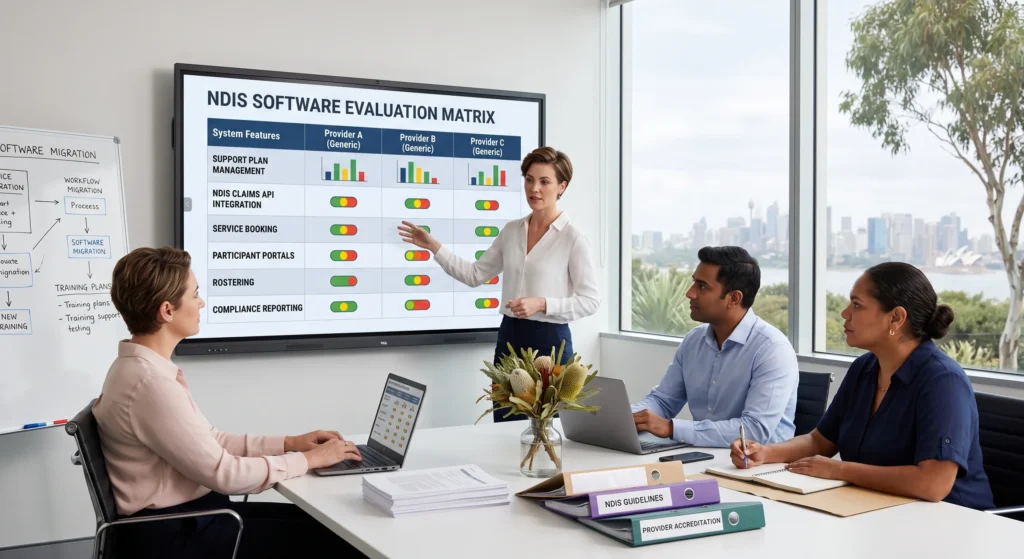
The best NDIS software should support your daily operations from participant onboarding through to service delivery, compliance and reporting. Rather than purchasing separate systems for rostering, invoicing and communication, consider a platform that brings these functions together in one place.
When comparing NDIS software Australia, look for features that improve efficiency, reduce manual work and support better decision-making.
Whether your organisation supports 20 participants or more than 2,000, the right NDIS software can simplify operations, improve efficiency and support consistent service delivery.
Must-Have Features vs Nice-to-Have Features
| Must-Have Features | Nice-to-Have Features |
|---|---|
| Participant management | Custom dashboards |
| Staff rostering and scheduling | Workflow automation |
| Progress notes | Digital document signing |
| Incident reporting | Customisable reports |
| Compliance management | Third-party integrations |
| Automated invoicing | SMS notifications |
| Real-time reporting | Business intelligence dashboards |
| Secure cloud access | AI-powered insights |
| Mobile accessibility | Custom branding |
| Role-based user permissions | Advanced analytics |
While additional functionality can provide value, the essential features should always align with your organisation’s operational priorities.
Participant Management Should Be Your Highest Priority
Every service you deliver begins with accurate participant information. Your software should allow staff to access participant records, goals, support plans, documents and communication history from a single location.
Managing information across multiple spreadsheets or disconnected systems increases the likelihood of errors and duplicated work.
An integrated NDIS Client Management solution helps centralise participant information, improve collaboration between teams and provide continuity of care throughout the participant’s journey.
Workforce Management Should Simplify Daily Operations
Staff scheduling is one of the most time-consuming responsibilities for many providers. Managing availability, participant preferences, shift changes and leave requests manually can quickly become difficult as organisations grow.
A purpose-built NDIS Rostering Software solution helps automate scheduling, improve workforce utilisation and reduce administrative effort while ensuring participants receive the right support at the right time.
When evaluating software, consider whether it can:
- Create recurring shifts
- Manage staff availability
- Handle last-minute schedule changes
- Allocate workers based on skills and qualifications
- Support mobile staff working across multiple locations
Compliance Should Be Built Into the Platform
Compliance should never rely on manual reminders or disconnected spreadsheets.
As NDIS requirements continue to evolve, providers need software that supports accurate record keeping, incident management and documentation aligned with the NDIS Practice Standards and guidance from the NDIS Quality and Safeguards Commission.
A dedicated NDIS Compliance solution helps organisations centralise policies, documentation and compliance workflows, making it easier to prepare for audits while reducing administrative risk.
When assessing software, ask whether it supports:
- Incident reporting
- Progress notes
- Document management
- Audit preparation
- Compliance reminders
- User activity logs
Reporting Should Support Better Business Decisions
Modern providers rely on data to improve operations and measure performance.
Instead of manually preparing reports each month, choose software that generates meaningful insights through automated dashboards and real-time reporting.
A comprehensive NDIS Reporting solution allows providers to monitor participant services, staff utilisation, financial performance and operational trends, enabling faster and more informed business decisions.
Useful reporting capabilities include:
- Participant service reports
- Staff productivity reports
- Compliance reporting
- Financial summaries
- Operational dashboards
- Custom report generation
Invoicing Should Save Time, Not Create More Work
Manual invoicing often leads to delays, duplicate work and billing errors.
An integrated NDIS Invoicing Software solution simplifies billing by automating invoices, improving claim accuracy and maintaining clear financial records.
When evaluating invoicing functionality, look for software that can:
- Generate invoices automatically
- Track claim status
- Manage participant funding
- Reduce manual data entry
- Produce financial reports
These capabilities help providers maintain healthier cash flow while reducing administrative effort.
Step 3: Choose Cloud-Based Software Over Traditional Systems
Many providers still rely on software installed on local computers or servers. While this approach may have worked in the past, cloud-based NDIS systems now offer greater flexibility, security and accessibility.
Cloud software allows authorised users to securely access participant information from the office, at home or while supporting participants in the community.
Cloud vs Traditional Software
| Cloud-Based NDIS Software | Traditional Software |
|---|---|
| Accessible from anywhere | Limited to office devices |
| Automatic software updates | Manual updates required |
| Secure cloud backups | Local backup responsibility |
| Easier collaboration | Limited remote access |
| Scales as your business grows | Often requires hardware upgrades |
| Lower IT maintenance | Higher infrastructure costs |
For providers managing remote teams or multiple locations, cloud-based NDIS tech offers greater operational flexibility and supports a more connected workforce.
Step 4: Prioritise Security and Data Protection
NDIS providers manage highly sensitive participant information, making data security a critical consideration.
When comparing software providers, ask how participant information is protected and whether the platform follows recognised security practices.
Important security features include:
Encrypted Data Storage
Multi-Factor Authentication
Role-Based Access Controls
Automatic Backups
Secure Cloud Hosting
Audit Trails
Permission-Based User Access
Selecting a secure NDIS provider system helps protect participant information while reducing organisational risk.
Step 5: Consider Ease of Use and Staff Adoption
Even the most feature-rich software will struggle to deliver value if staff find it difficult to use.
During software demonstrations, pay attention to the overall user experience.
- Can new employees navigate the system easily?
- Are common tasks completed quickly?
- Is the interface intuitive for office staff and support workers alike?
Mobile accessibility is equally important. Providers whose teams work across homes, community settings and multiple service locations benefit from digital tools that keep everyone connected.
Integrated solutions such as the Staff Companion App allow support workers to access shift details, participant information, tasks and updates while on the move. Likewise, the Client & Family App improves communication by giving participants and their families easy access to schedules, service updates and important information.
Software that is easy to adopt reduces training time, encourages consistent use and delivers a faster return on investment.
Expert Tip
Step 6: Choose Software That Can Grow with Your Organisation
The needs of your organisation today may look very different in three or five years. As participant numbers increase, your workforce expands or you introduce new services, your software should be able to scale without requiring a complete system replacement.
When evaluating NDIS management software, consider whether it can support:
- Additional participants and staff
- Multiple office locations
- Increased service offerings
- Higher reporting requirements
- Additional user permissions
- Future software integrations
Choosing a scalable platform reduces the need for costly migrations and helps ensure operational continuity as your organisation grows.
Step 7: Questions to Ask Before You Purchase NDIS Software
Before making a final decision, ask each software provider the same set of questions. This makes it easier to compare solutions objectively.
Software Evaluation Checklist
| Question | Why It Matters |
|---|---|
| Is the software designed specifically for Australian NDIS providers? | Ensures it aligns with NDIS requirements and workflows. |
| How long does implementation usually take? | Helps you plan the transition with minimal disruption. |
| Is onboarding and staff training included? | Supports faster adoption across your organisation. |
| How often is the software updated? | Keeps your system current with industry changes and improvements. |
| What customer support is available? | Reliable support reduces downtime and resolves issues quickly. |
| Can the software scale as we grow? | Avoids the need to replace your system as your organisation expands. |
| Are participant records stored securely? | Protects sensitive information and supports good governance. |
| Does the software integrate key business functions? | Reduces the need for multiple disconnected systems. |
Taking the time to ask these questions can help you identify which NDIS provider system offers the best long-term value.
Common Mistakes to Avoid When Choosing NDIS Software
Selecting software is a strategic business decision. Avoiding these common mistakes can save your organisation time, money and unnecessary disruption.
Choosing the Lowest Price Instead of the Best Value
Lower-priced software may lack essential functionality, resulting in additional costs as your organisation grows.
Focusing on Features Instead of Everyday Workflows
A long list of features means little if the software doesn’t support your team’s daily responsibilities efficiently.
Ignoring Staff Feedback
Support workers, coordinators and administrators use the software every day. Their feedback can provide valuable insights during the evaluation process.
Overlooking Customer Support
Even the best software requires occasional assistance. Choose a provider that offers responsive Australian-based support and ongoing product updates.
Planning Only for Today's Needs
Think beyond your current operations. Selecting software that supports future growth reduces the likelihood of another migration in a few years.
Signs You've Found the Right NDIS Software
As you compare different solutions, look for these positive indicators:
- ✓The platform is designed specifically for Australian NDIS providers.
- ✓ It combines participant management, rostering, invoicing, compliance and reporting within one system.
- ✓ Staff can learn and use the software with minimal training.
- ✓ Mobile access supports both office staff and field-based support workers.
- ✓ Customer support is responsive and knowledgeable.
- ✓ Regular updates keep the platform aligned with changing industry requirements.
- ✓ The software can scale alongside your organisation.
If a platform meets these criteria, it is more likely to deliver lasting operational value and support high-quality participant care.
Why More Providers Are Choosing Integrated NDIS Software
Many providers are moving away from managing separate systems for participant records, rostering, invoicing and reporting. An integrated platform brings these functions together, helping reduce duplicate work, improve collaboration and provide greater visibility across the organisation.
Nightingale Software combines these essential capabilities within one secure platform, enabling providers to manage participant information, coordinate staff, maintain compliance and access meaningful business insights from a single system.
Whether you’re looking to strengthen NDIS management, streamline administrative tasks or prepare your organisation for future growth, an integrated solution can help improve both operational efficiency and participant outcomes.
Conclusion
Choosing the right NDIS software Australia is about more than comparing features or pricing. It’s about selecting a platform that supports your organisation’s goals, simplifies everyday operations and provides the flexibility to adapt as your business grows.
By assessing your operational needs, prioritising essential functionality, considering security and compliance, and choosing software that can scale, you’ll be better positioned to make a confident and informed investment.
If you’re looking for an integrated platform that supports participant management, rostering, invoicing, compliance and reporting, Nightingale Software offers a solution designed specifically for Australian NDIS providers.
Contact Nightingale Software today to learn how the right technology can help your organisation improve efficiency, strengthen compliance and deliver better outcomes for participants and your team.
Frequently Asked Questions
What should I look for when choosing NDIS software?
Look for software that offers participant management, staff rostering, invoicing, compliance management, reporting, mobile accessibility, strong security and reliable Australian customer support.
Is cloud-based NDIS software better than desktop software?
For most providers, yes. Cloud-based software offers secure remote access, automatic updates, easier collaboration and greater scalability compared with traditional desktop systems.
How much does NDIS software cost in Australia?
Pricing varies depending on the number of users, features, implementation requirements and level of support. Providers should focus on overall value rather than selecting software based solely on cost.
Can small NDIS providers benefit from management software?
Yes. Even small providers can reduce administrative work, improve participant record management and strengthen compliance by using software designed specifically for NDIS service delivery.
How do I choose the best NDIS software for my organisation?
Start by identifying your operational requirements, then compare software based on functionality, compliance support, scalability, security, ease of use and customer service rather than price alone.
What features should every NDIS provider system include?
A quality NDIS provider system should include participant management, staff rostering, invoicing, compliance management, reporting, mobile accessibility and secure cloud storage.
Is NDIS software suitable for growing organisations?
Yes. Scalable software allows providers to add participants, staff and services without changing platforms, making it a practical long-term investment.
Does the NDIS provide software to providers?
No. The National Disability Insurance Scheme does not provide software directly to providers. Organisations choose their own software platform based on their operational requirements and business objectives.
Why is Australian-based support important?
Local support teams understand the Australian NDIS environment, respond during local business hours and provide assistance that reflects current industry requirements.